Product overview
SharePoint permission tracking with dated evidence
Product demo
See Access Witness in action
Watch the real Dashboard trace SharePoint access through groups and sharing links, investigate permission changes, review alerts and reports, and explain when an earlier answer is unknown.
Narration uses a synthetic voice.
Music: “Lightning on a Blue Sky” by Twin Musicom, licensed under Creative Commons Attribution 4.0. Source: YouTube Audio Library. Trimmed and mixed under the narration.
Read the video transcript
On screen: Access Witness. SharePoint Online Permission Tracker. Track SharePoint permissions over time.
Who had access to a SharePoint file, and how did they get it? Let's take a look.
Here's John Smith and the budget file on February 14, at 9 in the morning.
The recorded SharePoint permission is Read. The answer is Reconstructed from saved evidence.
One route is through Finance Visitors, a SharePoint group given Read permission on the Payroll folder.
The other route is a specific-people sharing link. Today, John's recorded access is gone.
Now look at Alex Turner, an external guest, on January 25.
His recorded permission was Edit, through an Entra security group called Finance Contractors.
That security group was inside Finance Visitors, a SharePoint group. The access was not granted directly to Alex.
Finance Visitors had Edit for part of January. Today's recorded permission for Alex is Read.
Investigations shows who made that change. Jordan Ellis raised Finance Visitors from Read to Edit on January 20.
On January 28, Jordan changed it back to Read. Both changes came from the audit log.
Microsoft 365 groups can grant SharePoint access too. Here, John's recorded permission on Vendor Contracts was Edit.
John belonged to Finance Team, a Microsoft 365 group inside the SharePoint group Finance Members.
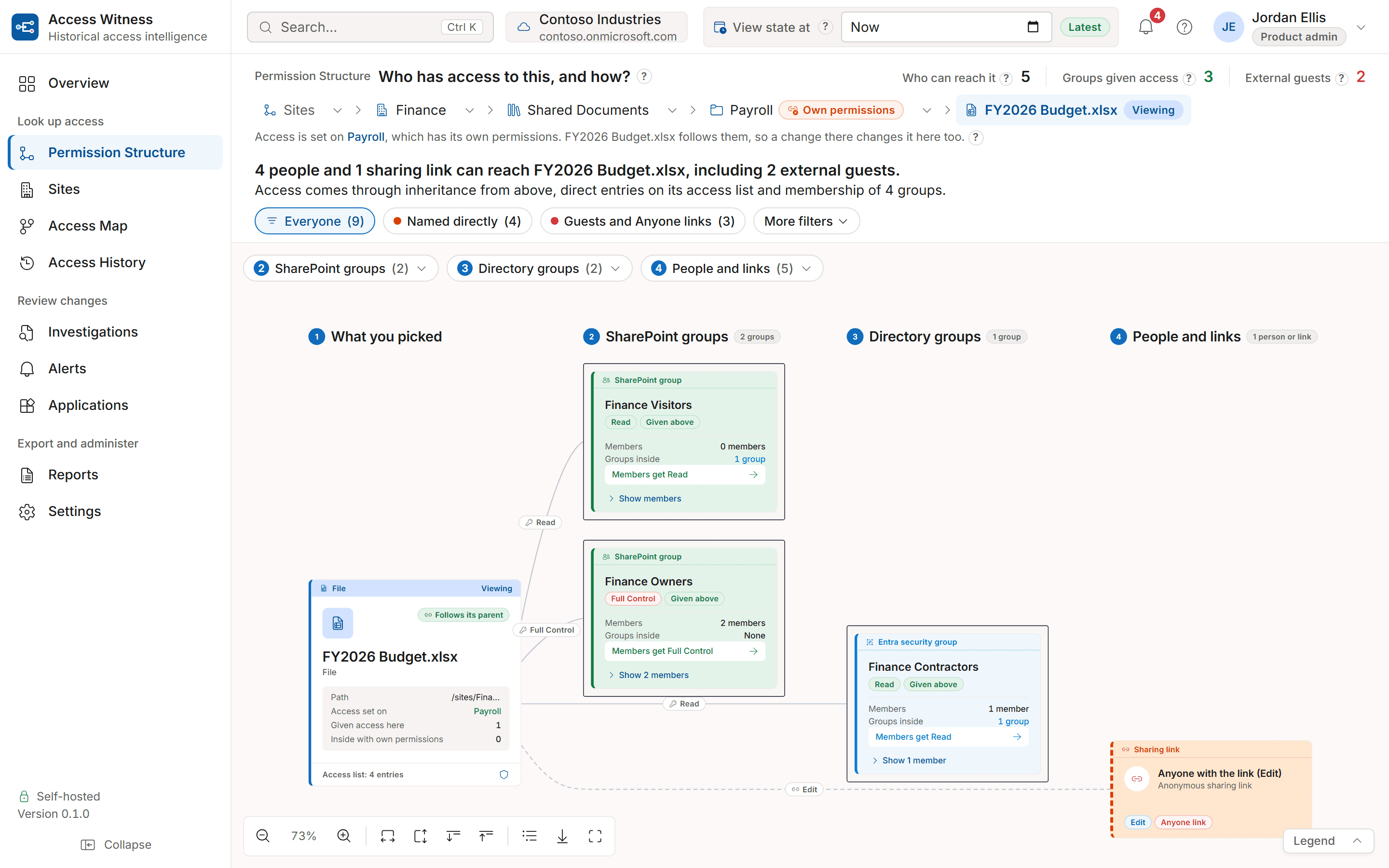
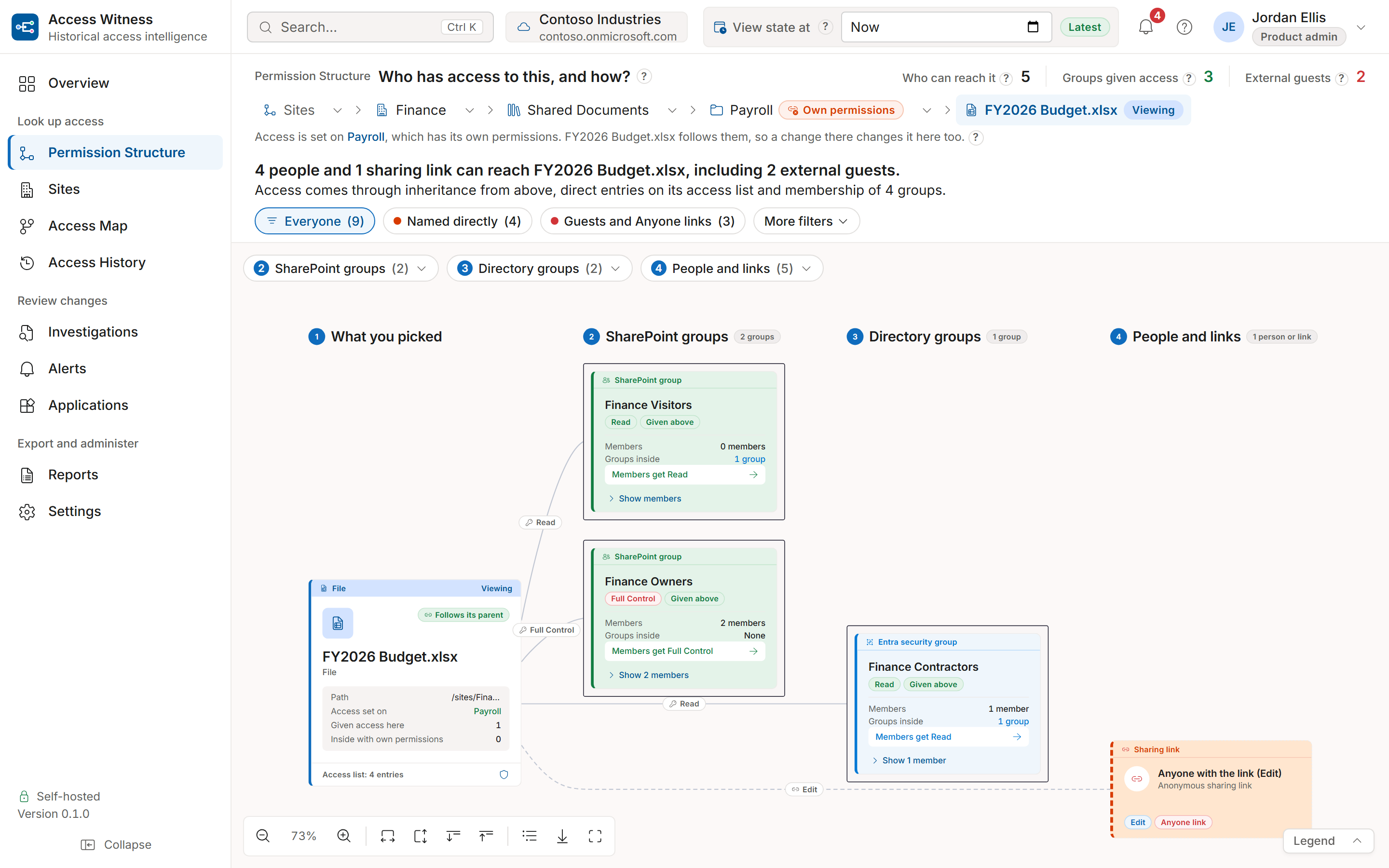
Permission Structure puts the groups, people and links together, so administrators can see where access comes from.
On screen: Older audit history: What about changes before the first scan?
On screen: Changes from before your first scan: After the first full scan, older SharePoint and Entra audit records Microsoft still keeps. How far back depends on your Microsoft audit retention. May show earlier changes, not everyone who already had access.
After a site's first full scan, Access Witness looks for older SharePoint and Entra audit records Microsoft still keeps.
It imports the records it can retrieve. How far back depends on Microsoft's audit retention.
Those records may show earlier changes, but not everyone who already had access.
So for September 1, before this site's first completed scan, the access answer is Unknown. Recording began October 1.
On screen: Alerts: Which changes need a closer look? Most permission changes are routine.
Permission changes happen all the time. Alerts pick out recorded changes that may widen access or give someone greater control.
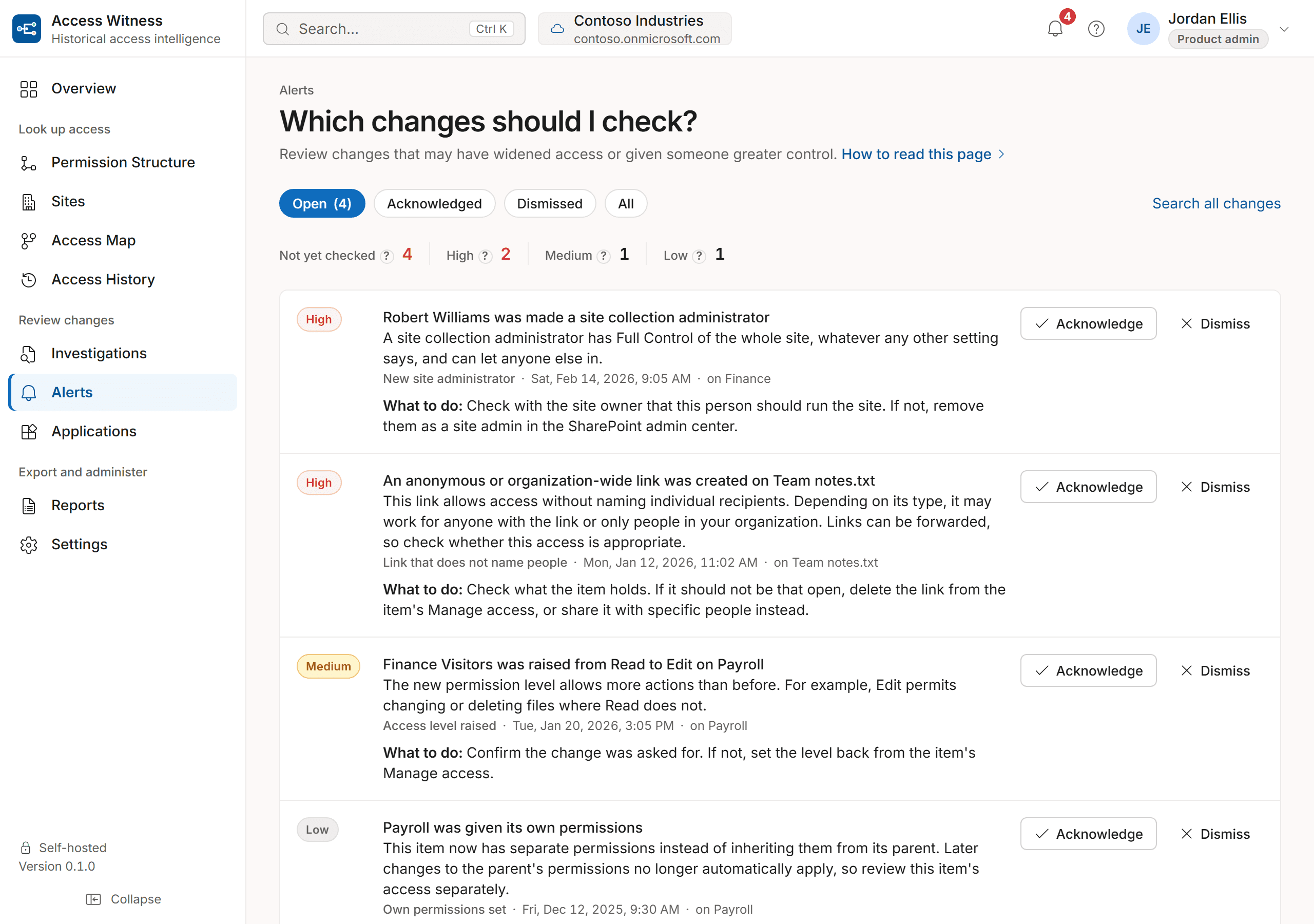
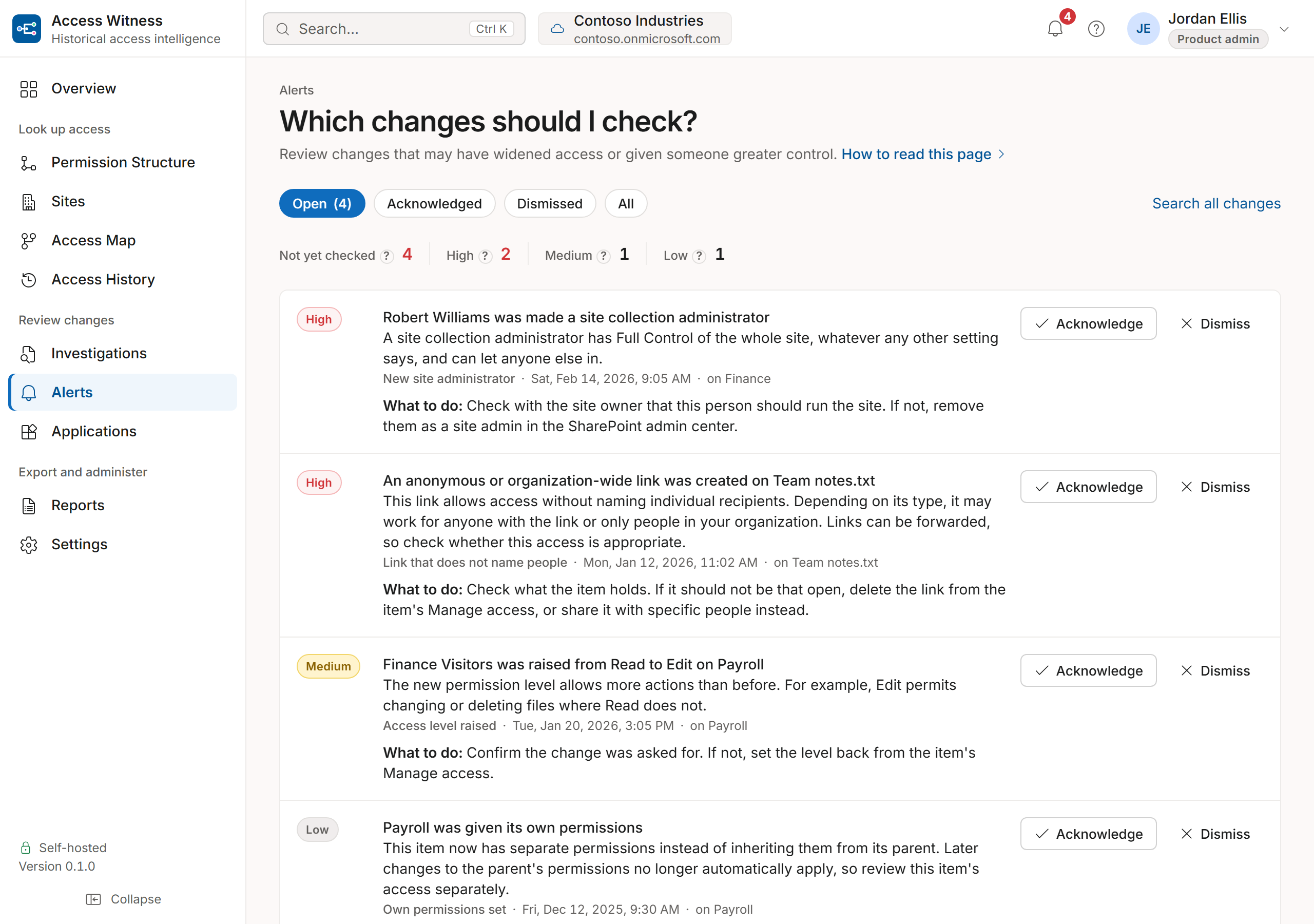
Remember Jordan's Read-to-Edit change? Here it is as a Medium alert. That change also increased Alex's recorded permission.
High alerts include a new site administrator or a sharing link that could reach many people.
Each alert explains why it matters and what to check. You can investigate the change, then acknowledge or dismiss the alert.
In Settings, choose which sites to watch, which changes raise alerts, and the minimum severity. Alerts appear in the Dashboard.
Reports let you preview recorded changes and download a CSV file for an auditor.
On screen: Your server. Your database. It reads permissions but does not change them.
Access Witness runs on your Windows Server and keeps history in your SQL Server database. It reads permissions but does not change them.
On screen: Track SharePoint permissions over time. Request a demo. accesswitness.com
If your team gets questions like these, request a demo at accesswitness.com.
Features
What is Access Witness?
Access Witness is a self-hosted SharePoint Online permission tracker that records permissions and changes over time, helping administrators investigate who had access, how they got it and what changed. It runs on your own Windows Server and stores the history in your own SQL Server database. It reads permissions but does not change them. Access Witness is made by NATHELVO TECHNOLOGIES INC.
History begins with each site's first completed scan. Earlier audit records may be available as evidence of changes, but they do not establish who had access before that first scan.
Looking for a Microsoft 365 permission tracker? Access Witness focuses on SharePoint Online, including access through Microsoft 365 groups and Microsoft Entra security groups.
Who had access, and when?
Access History
Choose a past date to see what SharePoint access someone had. See how they got that access and how much of the answer Access Witness can confirm.Access Map
See which SharePoint sites, folders and files a person or group can reach. View their permission levels in a picture or a list you can download.Applications
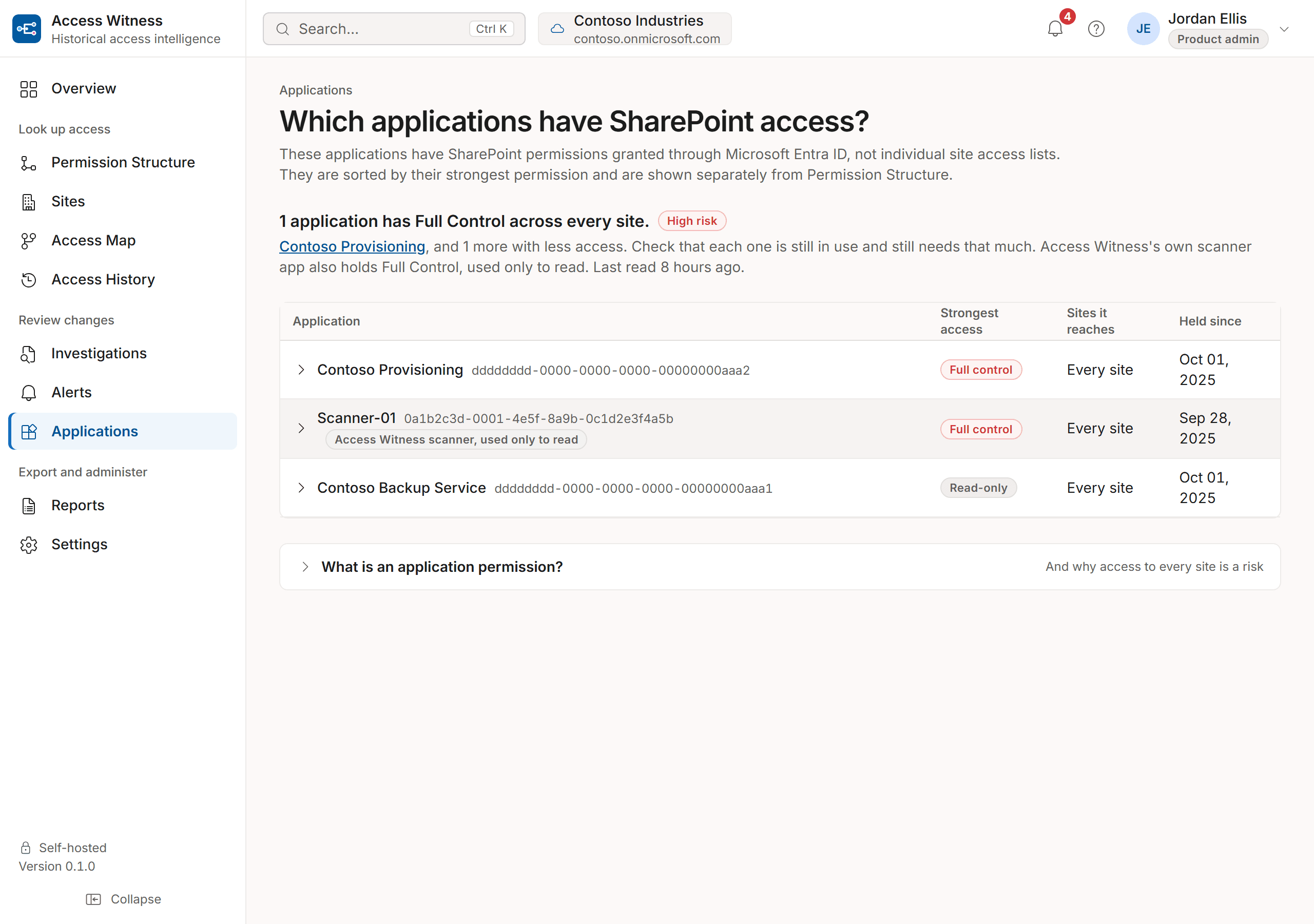
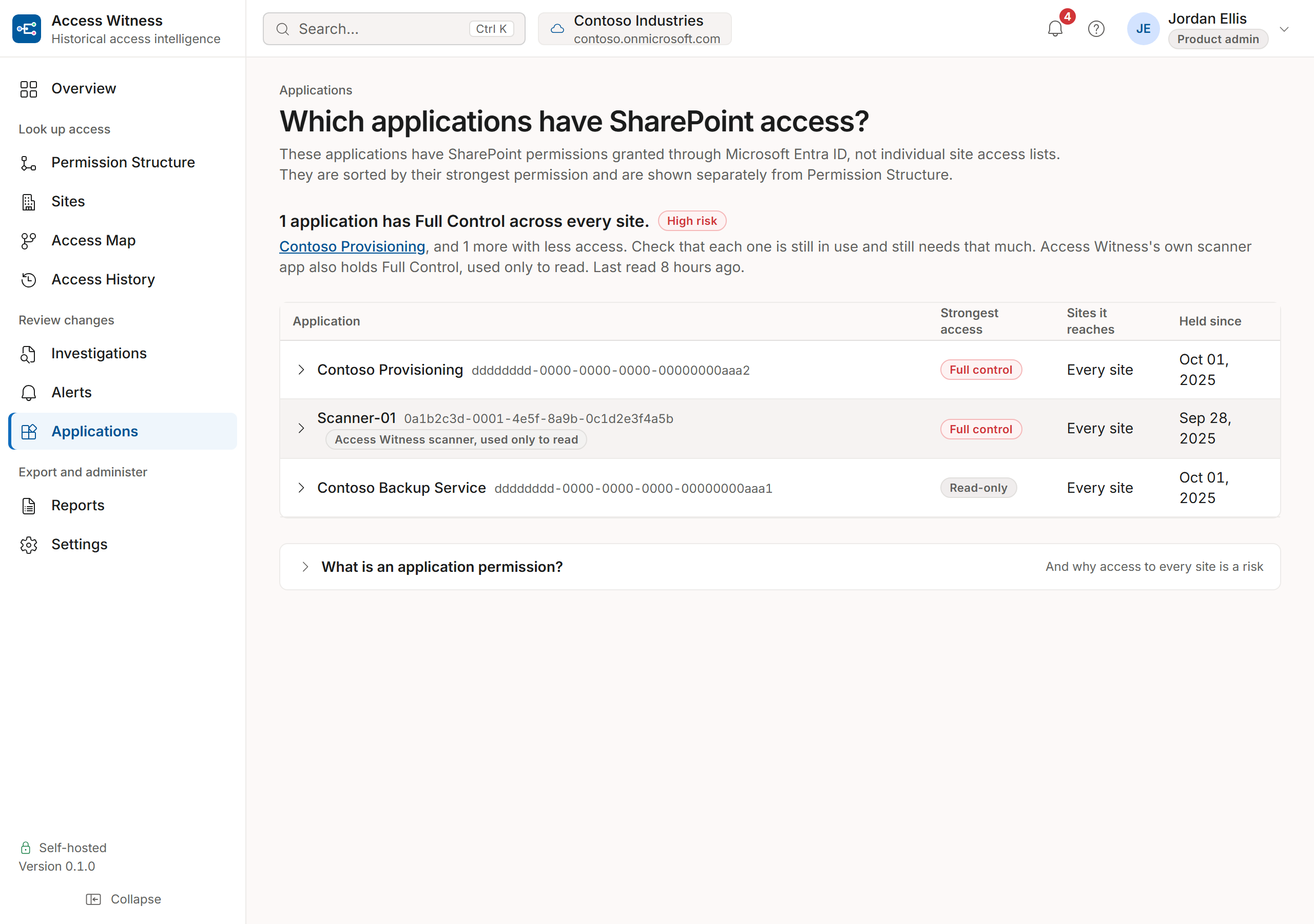
See which applications have SharePoint access through Microsoft Entra ID. This includes access that does not appear in a site's permission list.Sites
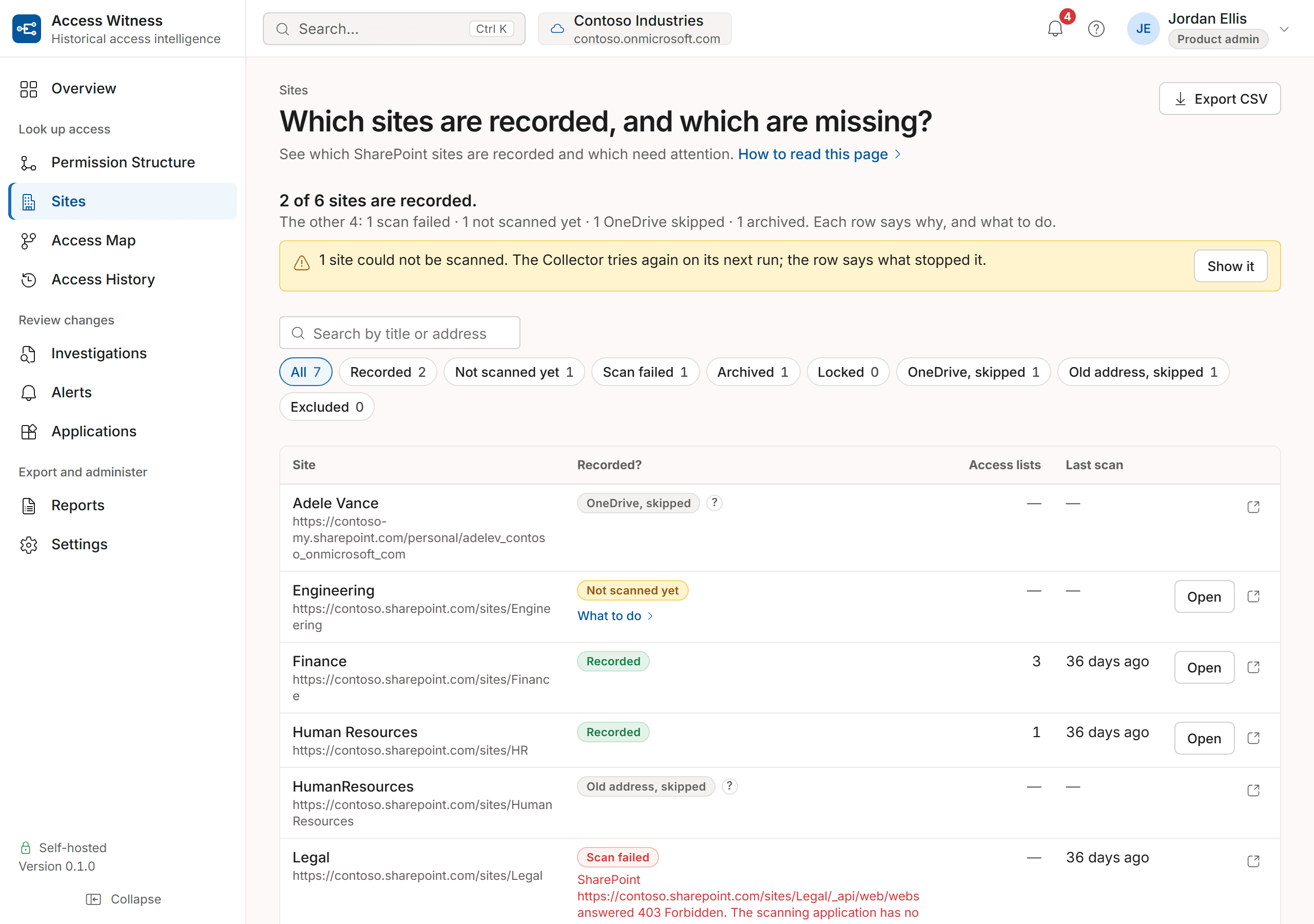
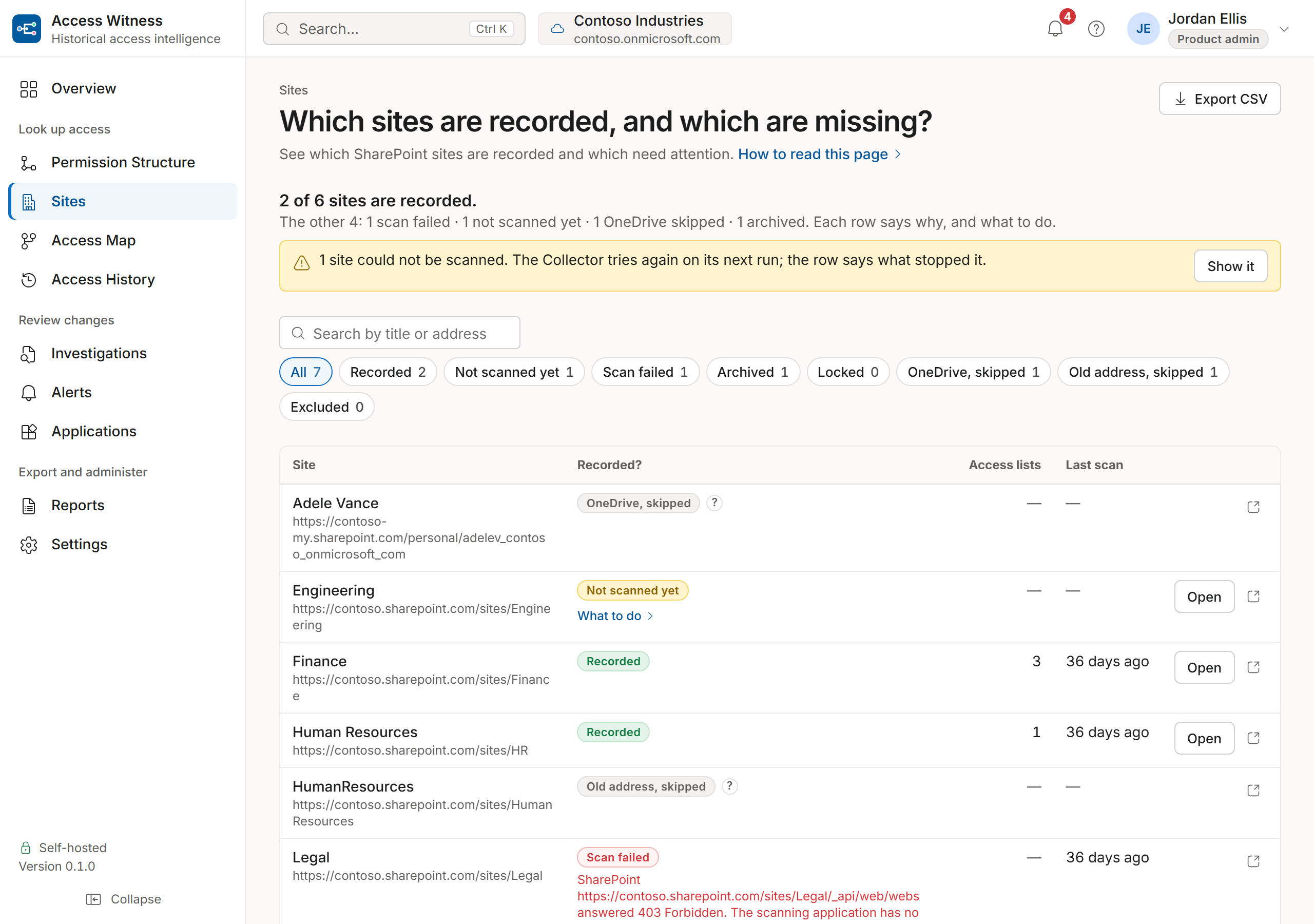
See which sites have been recorded. For sites that need attention, see why and what to do.
How did they get it?
Permission Structure
See who has access to a site, folder or file. Find out which groups or sharing links give them access and where the permissions were set.
What changed?
Investigations
See what permissions changed, when and who made the change if Microsoft 365 recorded their name. Search by person, location or date. Download the results.Alerts
See permission changes that may need attention. For example, someone was made a site collection administrator, or a group's access changed to Edit. Each alert explains why it matters and what to check.
What can we show an auditor?
Reports
Download access answers, permission changes, access maps and site lists with the records behind them.
Coverage
Is every site recorded?
See which SharePoint sites have been recorded. Find out why others have not been recorded and what needs attention.
Alerts
Which changes should I check?
Alerts highlights permission changes worth reviewing and explains why they matter.
Applications
Which applications have SharePoint access?
Applications shows which software has SharePoint access through Microsoft Entra ID, including permissions that do not appear on individual site access lists.
Principles
What you can rely on
How sure is the answer?
Every answer about the past has one of four labels: Verified snapshot, Reconstructed, Partial or Unknown. The label tells you how much Access Witness can confirm. For dates before a site's first completed full scan, the answer is Unknown, and older Microsoft 365 audit records may appear separately as evidence of a change. When the records aren't enough to confirm an answer, Access Witness shows the limits.
History stays when names change
Recorded history stays with the person, group or item when its name changes.
Dates and times you can check
See the recorded dates and times in your chosen time zone.
Corrections stay visible
If an answer is corrected, you can still see the earlier answer.
Scope
Does Access Witness track all Microsoft 365 permissions?
No. Access Witness tracks SharePoint Online permissions. It includes Microsoft 365 and Entra groups when they provide SharePoint access. It does not track Exchange mailbox permissions or Teams settings.
See Access Witness answer a question about SharePoint access.
Request a demo using sample data, or start a free 15-day trial on up to 10 sites you choose.